
Play Poly Roller online — free
Tilt the world and roll Roly the woodlouse to the goal. 80 levels in 8 worlds.
- A game for one player
- 3 difficulty levels
- Phone, tablet or computer — right in your browser
- Free — no sign-up, no download
About Poly Roller
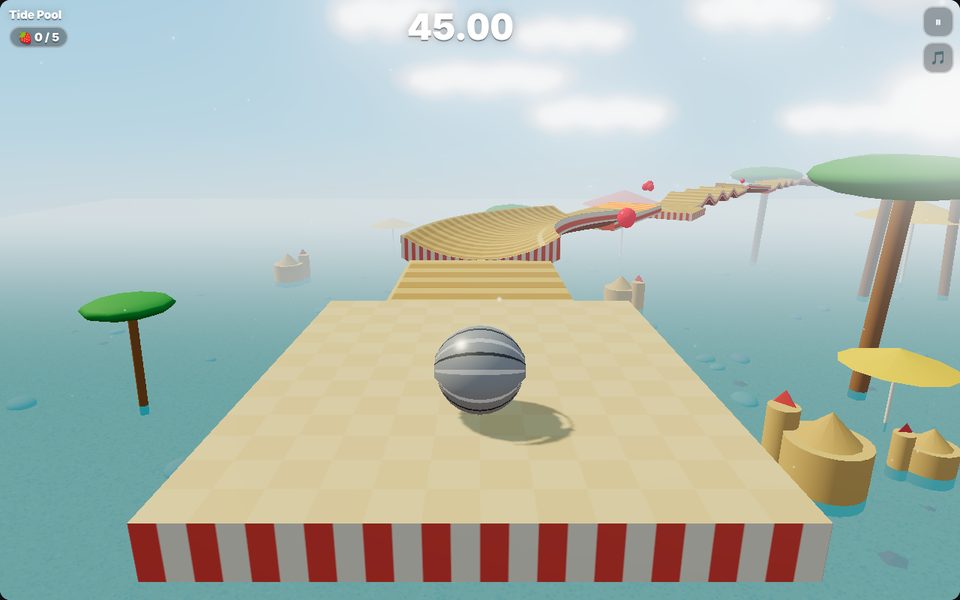
Poly Roller is a 3D ball-rolling game. You don't move the ball — you tilt the whole world, and Roly the woodlouse, curled up tight, rolls downhill. Guide Roly along narrow paths, round banked bends, over moving platforms, spinning discs and see-saws, and into the goal before the clock runs out.
There are 80 levels in 8 worlds: a garden path, a mushroom grove, a lily pond, a kitchen counter, a sandcastle beach, a frosty window, a firefly night and a clockwork shed. Earn three stars a level, race a whole world against the clock for the leaderboard, roll as far as you can in Endless, try the Daily Roll, race computer bugs or knock them out of the arena in Bumper Bash. Play with the keyboard, a game controller, an on-screen joystick or by tilting your phone.
How to play Poly Roller
Goal
You don't move Roly the woodlouse — you tilt the whole world, and Roly, curled up in a ball, rolls downhill. Get to the goal gate before the clock runs out without rolling off the edge.
Stop rolling for a moment and Roly peeks out to see where you're going.
Controls
- Computer: W A S D or the arrow keys tilt the world. P or Esc = pause, R = restart the level, M = music, Enter = carry on.
- Game controller: the left stick (or d-pad) tilts — push gently for a small tilt. Start pauses, Back restarts, Y switches the music. On the map, results and pause menu the stick or d-pad moves the highlight, A chooses, B goes back, and LB / RB change world on the map.
- Phone / tablet — joystick 🕹️: touch anywhere and drag; the further you drag, the steeper the tilt.
- Phone / tablet — tilt 📱: tilt the phone itself. Tap 📱 to switch it on (iPhones ask for permission first). Hold the phone how you like when you start — that's level; the pause menu has Recentre.
Things on the courses
- 🍓 Berries — collect them all for a star. Ice is slippery, sand slows you down, conveyors carry you along, orange boost pads fire you forwards and pink springs bounce you up to higher ledges.
- Moving platforms, lifts, spinning discs, see-saws, sweeping arms, pistons, bumpers, half-pipes, banked turns, corkscrews, funnels, stepping stones, swinging weights, wavy roads, wind and jumps. The levels get harder all the way from 1 to 80: narrower paths, fewer side rails, faster hazards and longer courses.
- Roll off the edge and you go back to the start (or the last checkpoint flag) — the clock keeps running.
Stars
Each Adventure level has 3 stars: ⭐ finish it, ⭐ collect every berry, ⭐ beat the star time. Finish a world's levels to open the next world.
Ways to play
- 🗺️ Adventure — the 80 levels, on the world map.
- ⏱ World Run — a whole world in one go; signed-in players go on that world's leaderboard.
- ♾️ Endless — new courses forever, 3 lives. Leaderboard.
- 📅 Daily Roll — five courses, the same for everyone today. One go a day. Leaderboard.
- 🏁 Bug Race — beat three computer bugs to the finish.
- 💥 Bumper Bash — knock the computer bugs out of the arena.
Tips
- Small tilts! Roly speeds up fast — ease off before corners.
- Tilt back the other way to brake.
- On narrow beams, slow down first, then go straight.
Graphics: Low for older phones, Medium, or High for good computers (in the setup menu or the pause menu).
Poly Roller: questions and answers
Is Poly Roller free to play?
Yes. Poly Roller on Neon Game Cave is completely free — there's nothing to download and you don't need to sign up.
Can I play Poly Roller on my own?
Yes — Poly Roller is a game for one player. Play at your own pace whenever you like.
Can I play Poly Roller on my phone or tablet?
Yes. Poly Roller runs in the web browser on phones, tablets and computers, so there's no app to install. You can add Neon Game Cave to your home screen to open it like an app.
Do I need an account to play Poly Roller?
No. You can play straight away as a guest. Signing in with Google is optional — it keeps your games safe in the cloud and, in games with leaderboards, puts your best scores on them.