
Play Neon Stack online — free
Stack the falling blocks. Clear lines. Out-stack your mates.
- 1 to 4 players
- 5 difficulty levels
- Play on your own too
- Play friends or other players online
- Phone, tablet or computer — right in your browser
- Free — no sign-up, no download
About Neon Stack
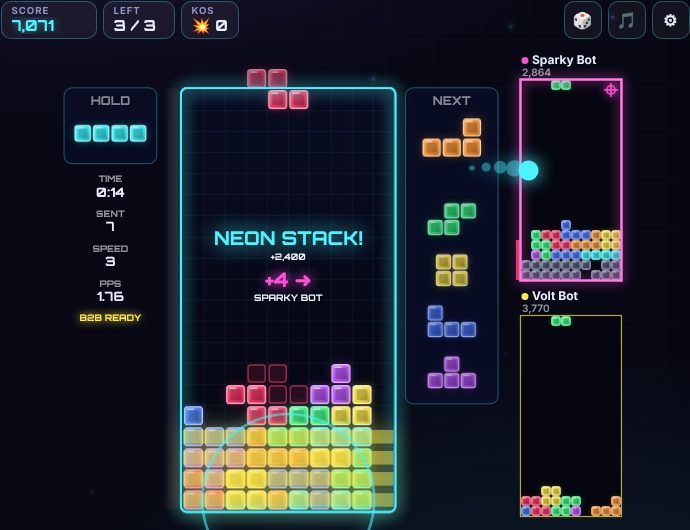
Neon Stack is a free falling-block puzzle game in glowing neon. Seven block shapes drop into the well — slide and turn them so they fill whole rows, which then clear away. Clear more rows at once for bigger scores, chain clears into combos, and the blocks fall faster as you level up.
Play the endless Marathon, a frantic 2-minute Blitz, the Daily Stack (the same pieces for everyone today) or relaxed Zen. In a battle, every few rows you clear send junk rows up into your rivals' wells — last one standing wins, against friends online or the computer.
How to play Neon Stack
Goal
Blocks made of four squares fall into a well 10 wide and 20 high. Move and turn them as they fall so they fit together. Fill a whole row from wall to wall and it clears — everything above drops down. If the stack reaches the top, it's game over.
The pieces
There are seven shapes, named after the letters they look like: I (the long bar), O, T, S, Z, J and L. They come in shuffled sets of seven, so you never wait long for any shape — and you can always see the next five.
Modes
- 🏃 Marathon — endless. Start at level 1, 5, 10 or 15. Every 10 lines you go up a level and the blocks fall faster. The music changes every 5 levels.
- ⚡ 2-minute Blitz — score as much as you can in two minutes. The level (and the points for each clear) goes up every 5 lines.
- 📅 Daily Stack — everyone gets the same pieces today. Clear 150 lines from level 1 for the best score you can. Only your first try each day counts for the daily leaderboard. It counts from your first piece — if you stop or leave, it scores what you had — and any later tries that day are practice.
- 🧘 Zen — no speed-up and no game over: if the stack reaches the top, the top rows are washed away and you carry on. No leaderboard — just relax. End it from the pause menu.
- ⚔️ Battle — 2 to 4 players, each with their own well (see below). Challenge someone, open a table, or play ⚔️ vs 1–3 🤖 computer players, from Rookie to Neon Master.
Controls
- Keyboard: ← → (or A D) move — hold to slide · ↓ / S soft drop · Space hard drop · ↑ X W turn right · Z Q Ctrl turn left · E / V half turn · C / Shift hold · P / Esc pause (solo and against the computer) · M music · T change target (battles of 3–4).
- Touch: the buttons under the well (hold a direction to slide), and swipes on the well — drag sideways to move, drag down to soft drop, flick down to hard drop, flick up to hold, tap the right half to turn right and the left half to turn left. Choose buttons, swipes or both in ⚙ Controls.
- Gamepad: d-pad or stick to move, down to soft drop, up to hard drop, A / B to turn, Y half turn, X or a bumper to hold, Start to pause.
- In ⚙ Controls you can also set how quickly a held direction slides, and switch the ghost piece and half turns on or off.
Handy things
- Ghost — the outline at the bottom shows where the piece will land.
- Hold — put the piece aside for later (once per piece) and swap it back when you need it.
- Hard drop drops the piece straight down and locks it. A soft drop speeds it up but lets you still slide it.
- Lock delay — once a piece lands you have half a second to slide or turn it. Each move or turn starts that half second again (up to 15 times).
- Wall kicks — a piece that can't turn where it is will hop sideways or up a little if there's room, so you can turn against walls and tuck pieces under overhangs.
Scoring
- 1, 2, 3 or 4 lines at once: 100 / 300 / 500 / 800 × the level. Four at once is a NEON STACK!
- T-spins: turn a T into a tight slot as it lands (three of the four corners around its middle are filled). T-spin single 800, double 1,200, triple 1,600; a mini T-spin is worth less. All × the level.
- Back-to-back: neon stacks and T-spins one after another (with no smaller clear between) score × 1.5.
- Combo: clear lines with piece after piece and each one adds 50 × combo × level.
- Perfect clear: empty the whole well for a big bonus.
- Soft drop: 1 point a row. Hard drop: 2 points a row.
- Your best scores are kept in a top 10 for each mode on this device, and signed-in players go on the leaderboards. Solo games are saved as you go, so a reload carries on where you were.
Battles
- Everyone gets the same pieces. Clearing lines sends garbage rows (grey, with one gap) to an opponent: double 1, triple 2, neon stack 4, T-spin double 4, T-spin triple 6, back-to-back +1, combos send extra, a perfect clear sends 10.
- Garbage coming your way shows as a red bar beside your well. It rises after your next piece that clears nothing — but any lines you clear first cancel it.
- With 3–4 players, choose who your attacks go to with the 🎯 button (or T): 🎲 Random, ⚔️ Attackers (whoever has been hitting you) or 💀 Weakest (the highest stack) — or tap a player's well to aim at them.
- The speed goes up as the battle goes on. After 1:30 attacks hit harder, and after 3:00 it's overtime: garbage rises in every well every 10 seconds.
- Top out and you're out. Knock someone out with your garbage and you get the KO. Last one standing wins.
Tips
- Keep the stack low and flat, and leave one column open at the side for the long I bar.
- Use hold to save the I bar (or a T) for the right moment.
- Don't panic when garbage is coming — clearing lines quickly cancels it.
- Watch the next five pieces and plan two or three ahead.
Neon Stack: questions and answers
Is Neon Stack free to play?
Yes. Neon Stack on Neon Game Cave is completely free — there's nothing to download and you don't need to sign up.
Can I play Neon Stack on my own?
Yes. You can play Neon Stack on your own as well as with other people.
How do I play Neon Stack with a friend online?
Open the Game Cave and challenge your friend from the Players online list in the lobby, or open a table for up to 4 players. To be sure you find each other, share a chat room code first — friends in a chat room also get free text chat during the game.
Can I play Neon Stack on my phone or tablet?
Yes. Neon Stack runs in the web browser on phones, tablets and computers, so there's no app to install. You can add Neon Game Cave to your home screen to open it like an app.
Do I need an account to play Neon Stack?
No. You can play straight away as a guest. Signing in with Google is optional — it keeps your games safe in the cloud and, in games with leaderboards, puts your best scores on them.