
Play Ludo online — free
Roll a six, race round, send rivals home.
- 1 to 4 players
- Play the computer — 5 levels
- Play friends or other players online
- Phone, tablet or computer — right in your browser
- Free — no sign-up, no download
About Ludo
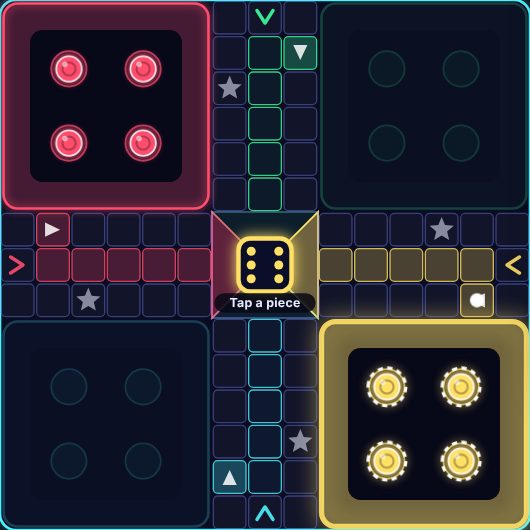
Play ludo free in your browser. Roll a six to bring a piece out, race all four of your pieces round the board and up your home column, and land on rivals to send them back to their yard.
Play the computer or open a table for up to four players online, and choose your house rules for exact finishes, safe squares and capture bonuses.
How to play Ludo
Goal
Race all four of your pieces from your yard, once round the board and up your own coloured home column into the centre. The first player with all four pieces home wins.
Setup
2, 3 or 4 players. Each colour has a corner yard holding its four pieces, a start square just outside it (the coloured square with the arrow) and a home column leading to its triangle in the middle. With two players, Red and Yellow play from opposite corners; with three, Green joins. Red goes first and turns go clockwise.
On your turn
- The die is rolled for you — fairly: every roll mixes a secret random number from your browser with one from another player's, so nobody can choose or predict it.
- A piece leaves the yard only on a 6: it goes onto your start square.
- Otherwise move one piece forward (clockwise) by exactly the number rolled. The pieces that can move pulse — tap one (or the dot where it would land).
- Rolling a 6 gives you another roll. But a third 6 in a row ends your turn at once, without moving.
- If none of your pieces can use the roll, your turn passes automatically.
- Your own pieces may share a square. There are no blockades — anyone may pass or land on any square.
Capturing & safe squares
- Land exactly on a square holding another colour's piece (or pieces) and they are captured: sent back to their yard to wait for another 6.
- The four start squares and the four star squares are safe: pieces there can't be captured, and different colours can share them.
- Option Safe squares: Off — no square is safe, not even start squares (coming out on a 6 captures anyone sitting on your start square).
- Option Capture bonus: Extra roll — every capture earns another roll.
Getting home
- Just before your start square a piece turns off the track into your home column, where no one else can reach it, and then into the centre.
- Option Finish: Exact roll (default) — you need the exact number to land in the centre; a bigger roll can't be used for that piece. Any roll — a big enough roll takes it home.
Players who leave
In a game of three or four, if someone leaves (or disconnects and the others choose to carry on), their pieces are taken off the board and their turn is skipped from then on. If only one player is left, they win.
How the game ends
- The game ends as soon as one player has all four pieces home — they win.
- Everyone else is placed by how far their pieces have travelled (the number on the results card is the % of the way home). The 🏠 count by each name shows pieces home.
Tips
- Get a second piece out early — with only one piece on the board, every roll has to be spent on it.
- A piece 1–6 squares in front of an opponent is in danger. Hop onto a star or start square when you can.
- When you roll a 6, think about using it to capture or escape — you'll roll again anyway.
- Once a piece is in its home column it's completely safe: spend rolls on the pieces still at risk.
Ludo: questions and answers
Is Ludo free to play?
Yes. Ludo on Neon Game Cave is completely free — there's nothing to download and you don't need to sign up.
Can I play Ludo against the computer?
Yes. Choose "Play the computer" and pick one of 5 levels — from a gentle beginner to a tough opponent.
How do I play Ludo with a friend online?
Open the Game Cave and challenge your friend from the Players online list in the lobby, or open a table for up to 4 players. To be sure you find each other, share a chat room code first — friends in a chat room also get free text chat during the game.
Can I play Ludo on my phone or tablet?
Yes. Ludo runs in the web browser on phones, tablets and computers, so there's no app to install. You can add Neon Game Cave to your home screen to open it like an app.
Do I need an account to play Ludo?
No. You can play straight away as a guest. Signing in with Google is optional — it keeps your games safe in the cloud and, in games with leaderboards, puts your best scores on them.