
Play Depth Charge online — free
Hide your fleet. Hunt theirs.
- 1 or 2 players
- Play the computer — 5 levels
- Play friends or other players online
- Phone, tablet or computer — right in your browser
- Free — no sign-up, no download
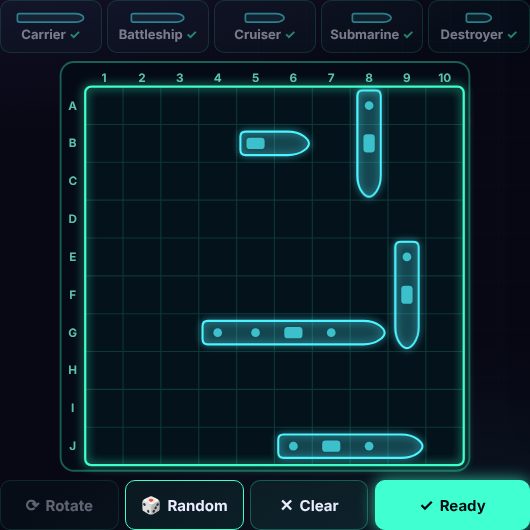
About Depth Charge
Depth Charge is a game of hidden fleets. Place your five ships on a 10×10 sea, then take turns firing at your opponent's waters. Find and sink their whole fleet before they sink yours.
Choose whether ships may touch and whether a hit earns another shot, then play the computer or a friend online.
How to play Depth Charge
Goal
Find and sink all five of your opponent's hidden ships before they sink yours.
Your fleet
- Carrier — 5 squares
- Battleship — 4 squares
- Cruiser — 3 squares
- Submarine — 3 squares
- Destroyer — 2 squares
Each player has a 10×10 sea. Rows are lettered A–J from top to bottom, columns numbered 1–10, so a square is called something like E5.
Placing ships
- Tap a ship in the tray, then tap a square: the ship starts there and runs right (or down).
- Tap a placed ship to pick it up again, tap it a second time to rotate it, or drag it to a new spot. The Rotate button (or the R key) turns the selected ship.
- Ships go across or down, never diagonally, and can't overlap. If the game is set to "Ships may touch: No", ships can't even touch at a corner.
- In a hurry? Random places the whole fleet for you. Press Ready when you're happy.
Taking shots
- When it's your turn, the 🎯 Enemy waters grid is shown. Tap any square you haven't tried yet to fire.
- Your opponent's game answers instantly: miss (a splash), hit (an explosion) or sunk — the last square of a ship was hit.
- When the opponent fires, the board flips to 🚢 Your fleet for a moment so you can see where the shot landed. You can switch tabs any time.
- Normally turns alternate. With "Hit = shoot again" on, a hit or sink earns you another shot straight away.
Hits, misses and sinking
Hits and misses are marked on both grids. When you sink a ship its outline appears on the enemy grid and it's crossed off the little fleet list at the top of the board.
How the game ends
The first player to sink all five enemy ships (17 hits) wins. Afterwards both fleets are shown in full.
Fair play
Nobody can see your ships — not your opponent, not the server. When you press Ready, your fleet is sealed with a secret fingerprint (a cryptographic hash) that is sent to your opponent. At the end of the game both fleets are opened and checked against their fingerprints, and every "hit", "miss" and "sunk" is re-checked. Moving a ship or fibbing about a shot is caught automatically.
Tips
- Hunt on a checkerboard pattern: every ship covers at least two squares, so you only need to try half the board to find them all.
- After a hit, try the four squares around it, then keep going along the line once you find a second hit.
- Ships in the middle get found faster — edges and odd gaps are good hiding spots.
- Remember which ships are left: if only the Destroyer remains, gaps smaller than 2 can be skipped.
Depth Charge: questions and answers
Is Depth Charge free to play?
Yes. Depth Charge on Neon Game Cave is completely free — there's nothing to download and you don't need to sign up.
Can I play Depth Charge against the computer?
Yes. Choose "Play the computer" and pick one of 5 levels — from a gentle beginner to a tough opponent.
How do I play Depth Charge with a friend online?
Open the Game Cave and challenge your friend from the Players online list in the lobby. To be sure you find each other, share a chat room code first — friends in a chat room also get free text chat during the game.
Can I play Depth Charge on my phone or tablet?
Yes. Depth Charge runs in the web browser on phones, tablets and computers, so there's no app to install. You can add Neon Game Cave to your home screen to open it like an app.
Do I need an account to play Depth Charge?
No. You can play straight away as a guest. Signing in with Google is optional — it keeps your games safe in the cloud and, in games with leaderboards, puts your best scores on them.